Shopify app · 14-day free trial
Dash Quantity Break Pricing

One price for the shopper buying two. Another for the account that orders two thousand. Same product page, no second store, no spreadsheet on the side.

Dash Quantity Break Pricing helps Shopify merchants build pricing logic beyond basic discounts. Set quantity-based pricing at variant level, create customer-specific price lists, manage pricing across currencies and support more complex B2B and wholesale buying flows.

Works in Shopify admin, not only at checkout

Key a manual order into Shopify admin and the quantity breaks and customer price lists are already on the line items.

Most discounting apps stop at the online checkout. Dash Quantity Break Pricing sets the price itself, so phone orders, quotes and reorders your team creates by hand get the same tiers - and because it is a price, not a coupon, any payment gateway settles it: Shopify Shop, PayPal or whichever third-party gateway you run.

For every shopper

Volume discounts that sell the bigger basket

"Buy 3, save 17%" only works if the shopper sees it before they decide. Standard quantity breaks live on the product page as a clear table, apply automatically in the cart, and the 1+ price stays in sync with the variant and your market catalogues.

  • •Unlimited breaks per variant, per currency
  • •Compare-at price for the "was / now" effect
  • •Click a tier, and the quantity field follows

For the accounts that matter

Price lists for B2B and wholesale, no second store

Create a price list, give it a tag, assign customers or whole companies. A logged-in buyer sees their own tiers and pays them at checkout - or your sales team keys the order into Shopify admin and the same tiers land on it. Everyone else sees the standard prices. Your storefront stays one storefront.

  • •Company-level assignment - one change covers every buyer on the account
  • •Manual prices, a flat % adjustment, or both
  • •Currency follows the customer account

Storefront table preview

Show the saving before the shopper asks for it

Nobody adds a fourth unit on a hunch. Put the tiers where the decision happens - right under the price - and let the table do the persuading. Three of the looks below are cycling; every colour and label came from the theme editor, not from a developer.

Product page example
Volume pricing Theme-adaptive
Quantity Unit price
1 - 2 €119.99
3 - 4 €99.99
5+ €69.99
Quantity Unit price
1 - 2 €119.99
3 - 4 €99.99
5+ €69.99
Quantity Unit price Save
1 - 2 €119.99 -
3 - 4 €99.99 -17%
5+ €69.99 -42%

Inside the app

Built for the person who maintains 4 000 prices, not the one who demos 4

Every screen is Shopify admin, embedded - same components, same shortcuts, same place your team already works. Here is what it looks like with real data in it.

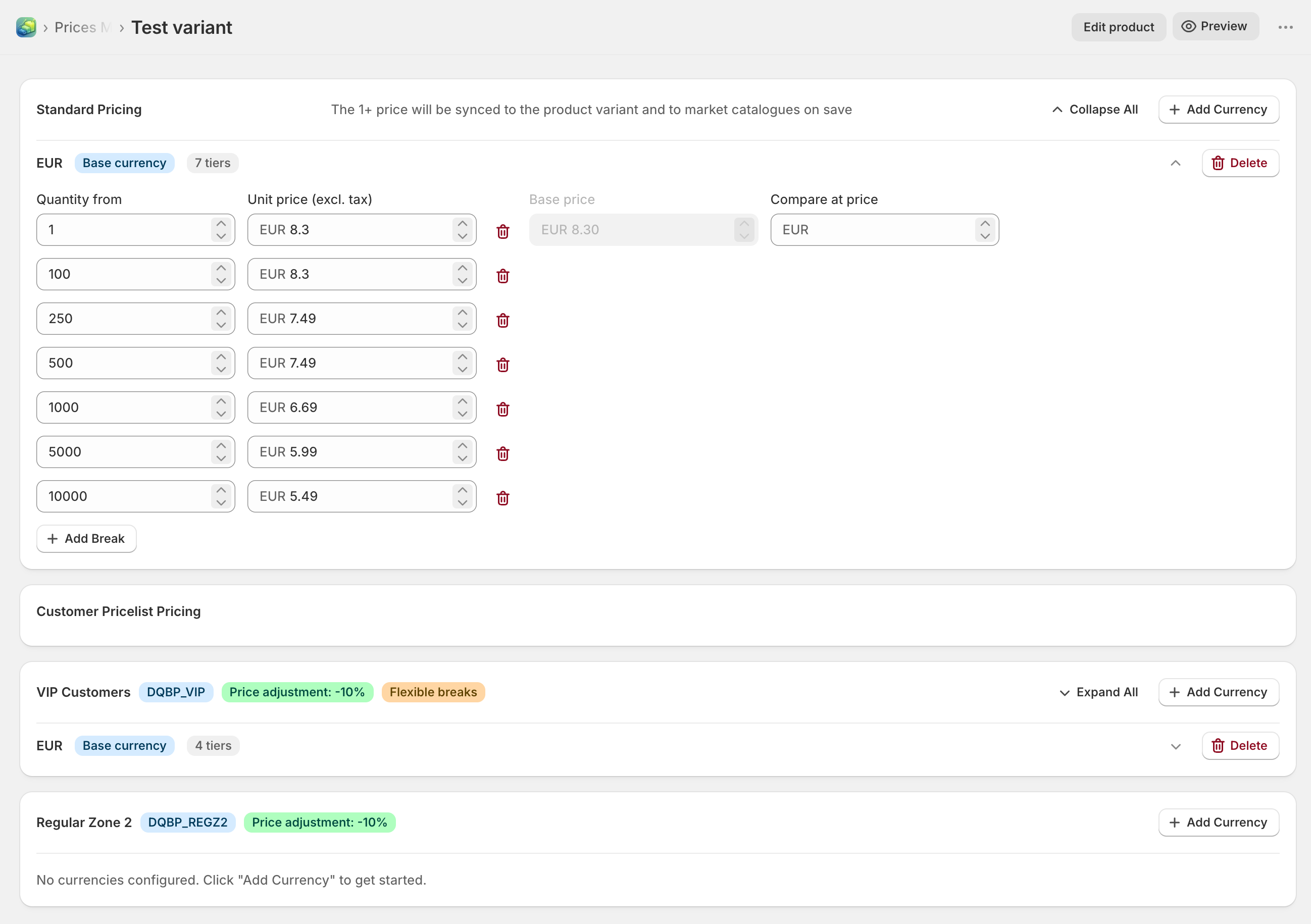
Dash Quantity Break Pricing - standard quantity breaks for a variant with seven tiers in EUR, plus two customer price lists below
One variant, the whole story. Seven standard tiers from 1+ to 10 000+, a compare-at price, and the customer price lists that override them - all on a single screen. The 1+ price syncs back to the variant and to market catalogues on save.
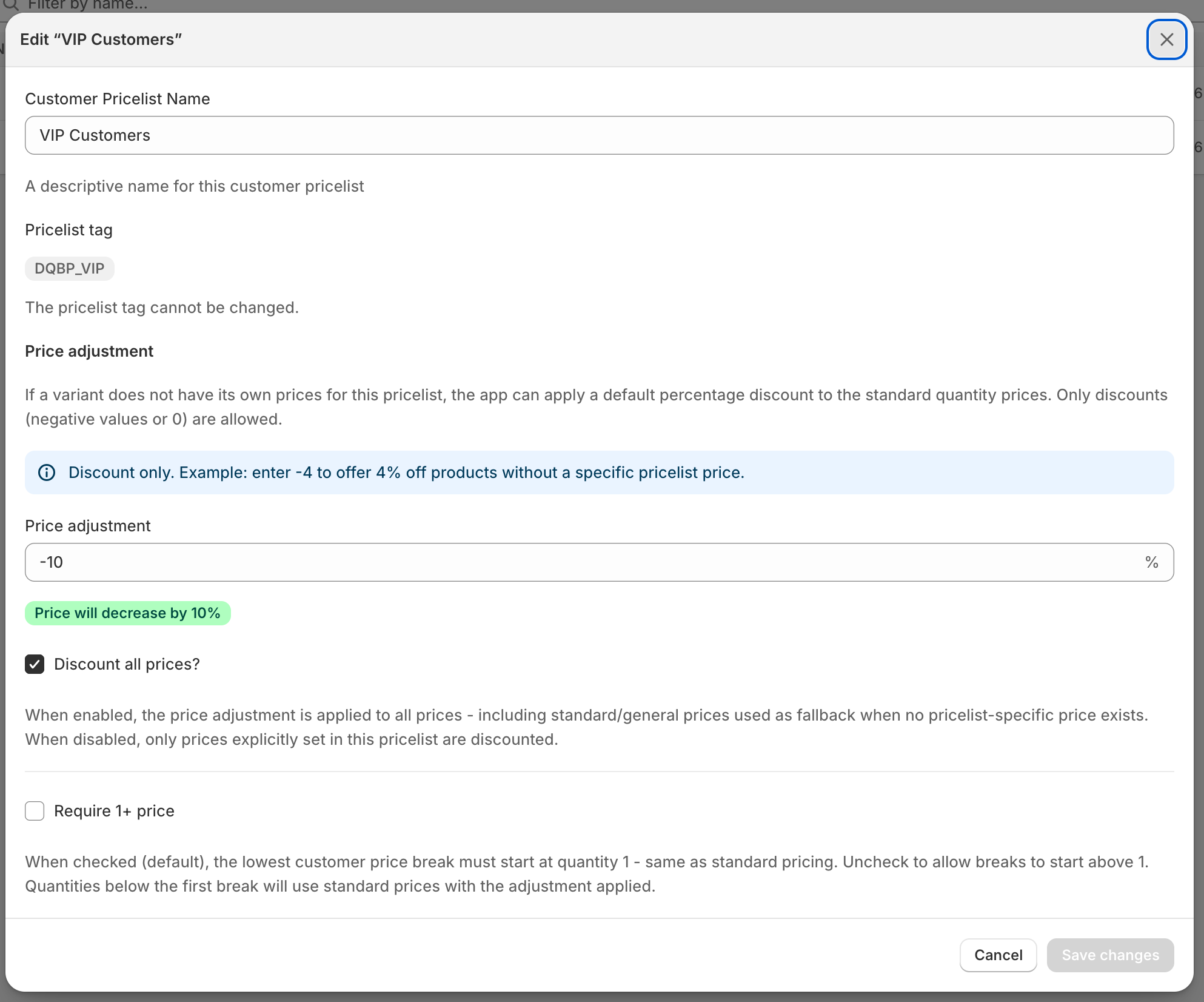
Dash Quantity Break Pricing - editing a customer price list with a -10% price adjustment, discount-all-prices and flexible breaks options
A price list in three decisions. A name, a percentage adjustment, and whether breaks may start above quantity one. A "VIP -10%" list needs no manual prices at all: it takes your standard tiers and knocks ten percent off. Add exact prices only where the deal is special.
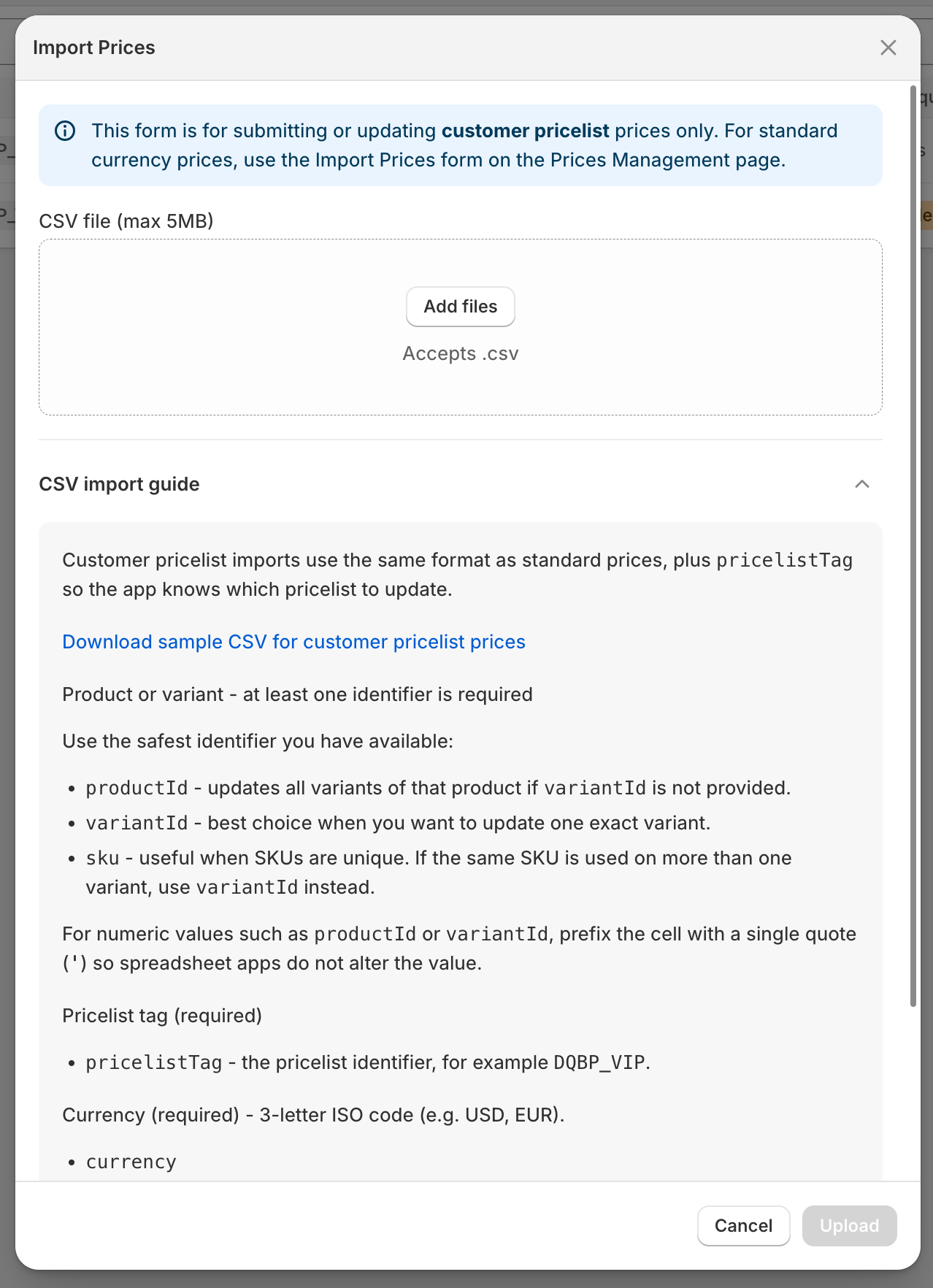
Dash Quantity Break Pricing - CSV import dialog for customer price list prices with the import guide open
Prices arrive as a CSV, not as a project. Identify rows by variant ID, product ID or SKU, one currency per row, one price list per tag. The guide and a sample file sit right inside the dialog, so the person doing the import does not need to open a ticket first.
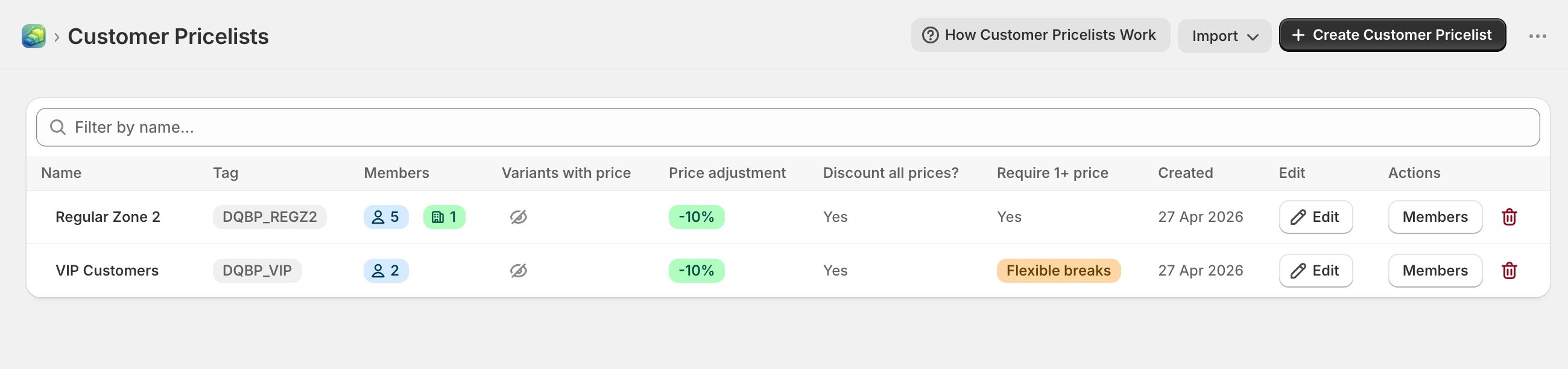
Dash Quantity Break Pricing - customer price lists overview showing members, companies, price adjustment and flexible breaks per list
Who gets what, at a glance. Each list shows its tag, its customers and companies, the adjustment and the rules. Assign members here, or straight from the customer and company pages in Shopify admin via the app's block.

How a customer price gets decided

Four rules. No surprises at the till.

  1. 1 · Who

    The buyer logs in. If their company is on a price list, that list applies to every buyer on the account. If only the customer is assigned, their own list applies. Otherwise: standard prices.

  2. 2 · Which price

    A price set explicitly for that variant on the list wins. If there is none, the list's percentage adjustment is applied to the standard quantity breaks - so a list can be complete with zero manual prices.

  3. 3 · Which currency

    Taken from the customer account. Priced that currency on the list? It is used as-is. Not priced? The discounted base price goes through Shopify's standard FX, so nobody ever sees an empty cell.

  4. 4 · Where it lands

    On the product page as the table, on the actual line item at checkout, and on manual orders your team creates in Shopify admin. What the shopper reads is what the order records - no coupon, no gateway it will not work with, no reconciliation on Monday.

Want a wholesale list that only starts at 1 000 units? Turn off "Require 1+ price" and everything below the first break falls back to standard tiers with the adjustment applied.

Plans

Priced like a utility, not like a consultant

Two plans, both with a 14-day free trial. Start on Basic to prove the table sells; move to Plus when you need more currencies, more price lists or a machine feeding the prices in.

Basic

For one currency and one special customer group.

$4.99 / month

or $49.99 / year - save 17%

  • ✓Unlimited standard quantity breaks
  • ✓Single currency
  • ✓One custom customer price list
  • ✓Flexible customer price list breaks
  • ✓CSV import
  • ✓Storefront table with theme-editor settings
Try Basic free for 14 days

Plus

B2B & multi-market

For many markets, many accounts, and prices that live in another system.

$29.99 / month

or $319.99 / year - save 11%

  • ✓Everything in Basic
  • ✓Unlimited currencies
  • ✓100 custom customer price lists
  • ✓Flexible customer price list breaks
  • ✓CSV import
  • ✓API import - let your ERP push the prices
Try Plus free for 14 days

Prices in USD, billed through Shopify. Cancel from your Shopify admin at any time.

Public API

Your prices, readable by anything that speaks HTTP

Ask for a variant's price at a given quantity, for a given price list and currency, and get the same answer the storefront would. Useful for ERPs quoting offline, B2B reports, AI agents answering "how much for 500", and headless storefronts that render their own tables. Documented as an OpenAPI specification, so a client is one generator run away.

Not sure it fits your catalogue?

Odd tier structures, a legacy price list in a strange CSV, a theme that fights every app block - describe it and you will get a straight answer on whether Dash handles it, and how.