CLICKAPLY
Clickaply Time Keepr
Menu-bar time tracking for freelancers and agencies. Clients, jobs, rates and time caps.
Build 1.5.48
Clients & jobs
Start timers where the work lives
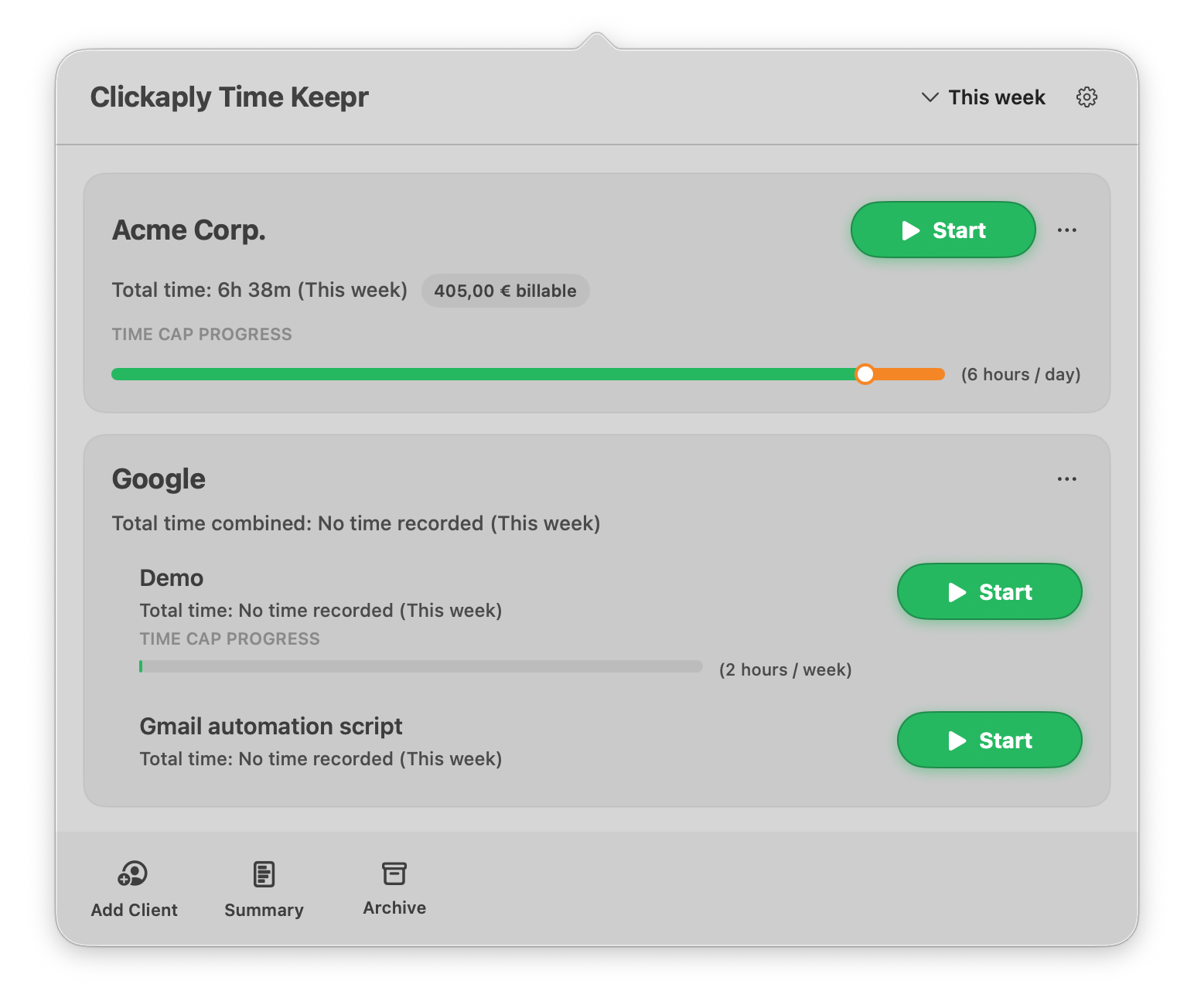
Each client shows total time for the selected range. Jobs sits under a client when you need separate time control.
- Start / stop from the client or job row without leaving the menu-bar panel
Billable & caps
See billable estimates and cap progress in the same view
Where a rate is set, the panel shows a billable total next to the time - like 405,00 € billable on Acme Corp. Optional time caps render as TIME CAP PROGRESS under the client or job, with the contracted limit labeled (for example 6 hours / day or 2 hours / week).
- Optional billing rates per client; jobs can inherit, override, or skip billing
- Units: per hour, day, week, month, or fixed total
- Hourly rounding (exact minutes / round up to 15 or 30 minutes / hour)
- Friendly warnings as you approach a contracted-hours cap
- Time Keepr does not create or send invoices
Ranges & summary
Switch the range, then open Summary
The top-right control sets the range shown on every client and job - This week in the screenshot. Open Summary from the bottom bar for day, week, month, and custom totals when you review what to invoice or plan next.
On your Mac
Local-first, with optional app awareness
Timers, clients, jobs, rates, and summaries stay on your Mac. Optional frontmost-app awareness helps refine net and billable time - processing stays on device. A running-timers desktop widget is available on macOS 26 or later.
- Lives in the macOS menu bar - no Dock clutter for day-to-day tracking
- Optional tracking of the frontmost app while timers run
- Exclude apps globally or per client/job
- Not used to send activity to a server
What’s included
Everything in the BETA
- Menu-bar panel with clients, jobs, and Start
- Billable totals and TIME CAP PROGRESS in the main view
- Summary by day, week, month, and custom ranges
- Optional frontmost-app awareness while timers run (local only)
- Running-timers desktop widget (macOS 26+)
- Backup and restore with
.clickaplybackupfiles - Launch at login
- In-app feedback and newsletter signup
Requirements
macOS, direct download
- macOS 15.3 or later
- Desktop widget requires macOS 26 or later
- Notarized Developer ID build (direct download · DMG)
- New builds are downloaded manually for now
Privacy
Data stays on your Mac
Time and client data stay on your Mac unless you submit feedback or subscribe to the newsletter, or you export a backup yourself.
Newsletter
Product updates and BETA notes
No spam.
Ready to try the BETA?
BETA builds may change. Export a .clickaplybackup
before installing a new build.